Clean Links vs Safari Advanced Tracking & Fingerprinting Protection for iOS 26
Apple's iOS 26 and macOS 26 push privacy forward by turning Advanced Tracking & Fingerprinting Protection (ATFP) on by default in Safari. That's a big win for in-browser privacy. But most of the mess you and your recipients experience isn't on the page; it's inside the link itself - the shorteners, redirect chains, and tracking parameters that live in the URL you're about to open or share.
This post shows how Clean Links complements Safari's protections so you (and the people you share with) land on the exact page you intended-nothing more, nothing less.
Update, May 2026: Clean Links now strips supported tracking parameters during Safari navigation on iPhone, iPad, and Mac before the page opens. Read the announcement: Safari Link Cleaner: Clean URLs Before the Page Opens.
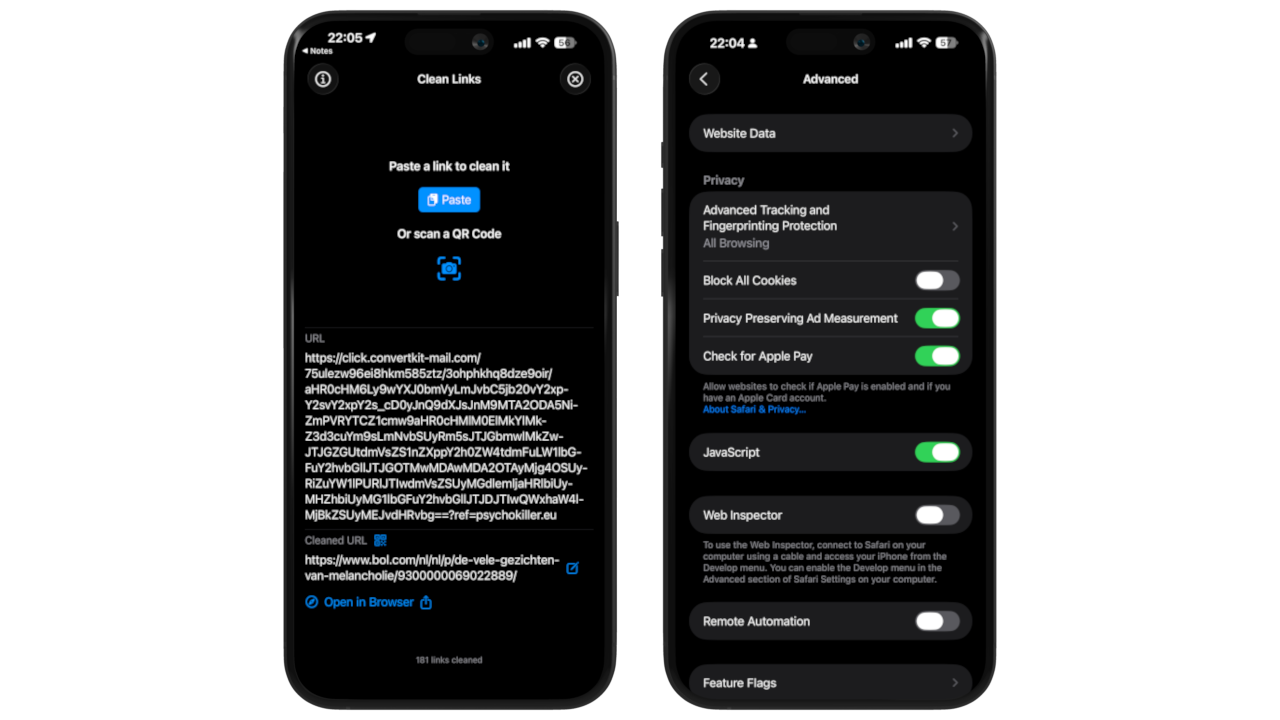
What Safari Advanced Tracking & Fingerprinting Protection Covers (And What It Doesn't)
- ATFP in iOS 26/macOS 26: Safari now obfuscates fingerprintable signals and strips many tracking parameters during navigation, reducing the data sites can use to follow you around the web.
- Safari-only scope: ATFP is a Safari feature. It doesn't apply inside in-app web views (the browsers built into social and messaging apps) or in other browsers. If you open links in a non-Safari browser or inside an app's web view, ATFP isn't there to help.
Translation: ATFP is excellent during Safari browsing. It's less helpful before a page loads (e.g., short links and redirects in the URL you tapped) and outside Safari (e.g., the Instagram or TikTok in-app browser).
Why Link Cleaning Still Matters in 2025
Social Platforms Wrap and Attribute Your Links
When you share a video or article, the URL is often wrapped first so platforms can log and attribute clicks:
- YouTube commonly routes outbound clicks through an internal redirect endpoint; attackers have even abused this mechanism to make malicious links appear trustworthy.
- Instagram/Facebook run external links through Link Shim (e.g.,
l.instagram.com,l.facebook.com) to scan and track clicks as explained by developers analyzing the system. - X/Twitter reduces every link to
t.co, recording click analytics along the way.
Even if your Safari strips some parameters, their servers still attribute and log via these wrappers - and your recipients may not be using Safari with ATFP at all.
Short Links and Redirect Chains Hide the Final Destination
bit.ly, t.co, lnkd.in (and friends) conceal the real URL until after you click. That's annoying for trust and terrible for privacy, because tracking and phishing often hide behind these redirects.
Clean Links: The "Pre-Click" Link Cleaner for iPhone, iPad, and Mac
Clean Links is a free, on-device utility that focuses entirely on the link itself - following redirects and stripping tracking from the final URL so what you open and share is truly clean.
-
Follow every hop, then clean the end URL - Paste or share any link. Clean Links expands shorteners and follows redirect chains in an isolated context (no cookies or identifiers), then removes tracking parameters (UTM, affiliate IDs, click IDs, etc.) from the final URL before you open or copy it. Result: you see and share the real destination, minus the ad-tech baggage.
-
System-wide, not Safari-bound - Use the Share Sheet from Safari, Mail, Messages, X/Twitter, Instagram, YouTube, TikTok - anywhere that shows the iOS share button. On Mac, run it from the menu bar with Clipboard Monitoring to auto-clean links as you copy them. Works no matter which browser you prefer.
-
On-device and private by design - All processing happens locally; no URLs are uploaded. Details available in the Clean Links FAQ.
-
Broad coverage, growing fast - Clean Links removes trackers across thousands of domains and thousands of parameters, and the coverage expands with each update as new patterns emerge. Examples and updates on the app site.
Clean Links vs Safari Advanced Tracking & Fingerprinting Protection: what to use when
| Feature | Clean Links | Safari ATFP (iOS 26/macOS 26) |
|---|---|---|
General browsing in Safari | Use as needed: clean the page URL before sharing | Great: ATFP strips many tracking params during navigation and reduces fingerprinting inside Safari tabs |
Links opened in in-app browsers (web views) | Share to Clean Links first; open the clean final URL in your browser of choice | Not covered (ATFP is Safari-only) |
Short links & multi-hop redirects | Expands and previews the final URL, then strips trackers right at the destination | Safari will follow, but doesn't preview the final URL or scrub at the end of the chain |
Sharing to friends/family on mixed devices | Share a direct, clean URL that avoids wrappers so recipients aren't tracked by platform redirects | Your outbound link may still be a platform wrapper (e.g., t.co, l.instagram.com). Recipients may not have Safari/ATFP |
Safari navigation and page-link cleaning | Strips supported tracking parameters before pages open, plus scans every link on the current page with one tap or click | ATFP works passively during Safari navigation but uses Apple's coverage list and cannot batch-clean links already embedded on a page. It is also limited to macOS/iOS 26, while Clean Links supports older OS versions |
Disable all network requests | Optional setting disables all outbound connections; still strips known tracking parameters without any outbound network connections to servers | No equivalent; Safari always makes network requests during navigation |
Send cleaned URL to Mac from browser | Send to Mac available directly from the Safari extension on both iPhone and Mac - works even outside AirDrop range | No equivalent; relies on iCloud Tabs or Handoff which require proximity |
Safari Extension: Clean Links Before and After Pages Open
Clean Links now adds automatic Safari navigation cleanup on iPhone, iPad, and Mac. Supported tracking parameters are stripped before the page opens, using Safari extension rules.
The extension also keeps the manual page cleaner. On Mac, it appears as a toolbar button. Click it, press "Clean Links," and the extension strips tracking parameters from every link on the current page - then shows you the count. On iPhone and iPad, access it from Safari's extensions menu to do the same in one tap.
Both platforms also include Send to Mac directly from the extension - share cleaned links to any of your Macs, even those outside AirDrop range or on a different network.
This is where Clean Links and Safari ATFP fit together. ATFP is a useful automatic baseline inside Safari. Clean Links adds broader parameter coverage, before-page-open cleanup, and active control over links already embedded on a page.
The Practical Recipe
- Keep ATFP on in iOS 26/macOS 26 - it's the default and it improves privacy for every Safari tab.
- Use the Clean Links Safari extension for broader automatic Safari cleanup and to clean every link on the page you're browsing - one tap on iPhone, one click on Mac. For links from other apps, use the Clean Links Share Sheet Extension.
- On Mac, enable Clipboard Monitoring so every copied URL gets cleaned automatically.
Safari ATFP (iOS 26/macOS 26) is a smart, automatic shield inside Safari. Clean Links is your precise, on-device link cleaner that works everywhere: it follows redirects, strips trackers from the end URL, and gives you clean URLs to open and share - across apps, browsers, and platforms.
Together, they cover both sides of the click.